B Pricing, Plans, and Limits
What it costs, which plan to choose, and how to manage your usage
Understanding how Claude Code pricing works, and how to manage your usage, prevents bill shock and helps you get the most value from your subscription.
B.1 Plan Comparison
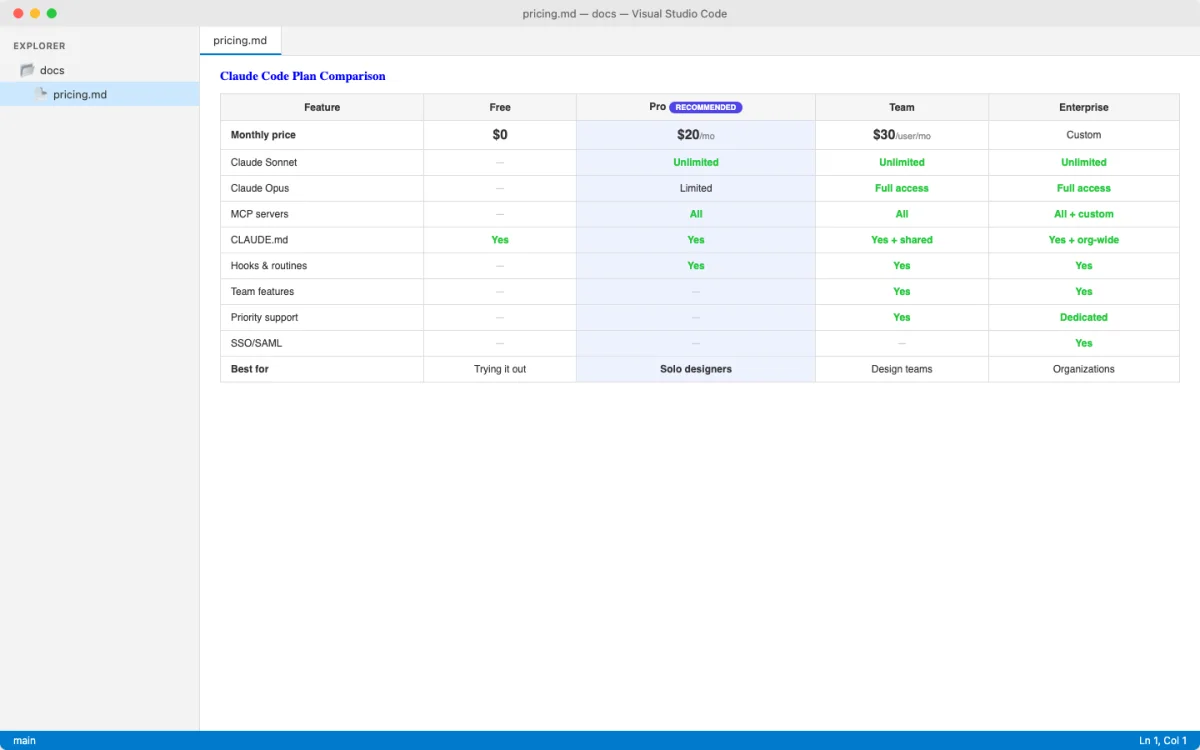
Plan Comparison
Claude Code is included with every paid Claude plan. The difference between plans is how much you can use it before hitting rate limits.
All pricing data below is a May 2026 snapshot. Anthropic updates pricing, limits, and plan packaging periodically. Verify current prices, plan features, and data-handling terms at official Anthropic pages before making decisions, and do not treat this appendix as procurement, legal, tax, or accounting advice.
Individual Plans
| Plan | Monthly Price | Claude Code | Usage Level | Best For |
|---|---|---|---|---|
| Free | $0 | No | Baseline | Trying Claude chat before committing |
| Pro | $17/mo (annual) or $20/mo (monthly) | Yes | More than Free | Getting started with design-to-code work |
| Max 5x | $100/mo | Yes | 5x Pro | Daily design-to-code work with heavy usage |
| Max 20x | $200/mo | Yes | 20x Pro | Professional designers running Claude Code all day |
Team and Enterprise Plans
| Plan | Price | Claude Code | Key Features | Best For |
|---|---|---|---|---|
| Team Standard | $20/seat/mo (annual) | Yes | SSO, central billing, more usage than Pro | Design teams with occasional Claude Code users |
| Team Premium | $100/seat/mo (annual) | Yes | 5x standard seat usage, all Team features | Design teams with heavy Claude Code power users |
| Enterprise | $20/seat + API usage rates | Yes | SCIM, audit logs, HIPAA-ready, spend limits | Design orgs needing compliance and admin controls |
Usage limits are the most common reason people upgrade. Anthropic does not publish specific token counts or message limits. Limits are described relative to each other (Max 5x = 5x Pro usage). When you hit a limit, you see a rate limit error and must wait or upgrade. If you use Claude Code for more than an hour a day, budget for Max 5x.
Plan Recommendations for Designers
| You Are | Your Usage | Recommended Plan | Monthly Budget |
|---|---|---|---|
| Exploring AI coding tools | A few sessions per week | Pro | $17-20 |
| Serious design-to-code practitioner | 1-3 hours daily | Max 5x | $100 |
| Full-time AI-assisted designer | All day, every day | Max 20x | $200 |
| Design team lead | Mix of power users and casual users | Team (mix standard + premium seats) | $20-100 per seat |
| Design org at a large company | Many teams, compliance needs | Enterprise | $20/seat + usage |
B.2 Usage Optimization
Usage Optimization
Context is the currency of Claude Code. Every file read, every screenshot pasted, every command output consumes context. Managing it well means more productive sessions and fewer rate limit hits.
| Technique | How | Savings | Trade-off |
|---|---|---|---|
| Use Sonnet for routine tasks | /model sonnet or --model sonnet |
Faster responses, fewer tokens | Slightly less capable than Opus for complex architecture |
| Set effort level to match the task | --effort low for extractions, high for redesigns |
30-50% fewer tokens on simple tasks | Low effort produces shallower analysis |
| Compact between major tasks | /compact or /compact "keep only design tokens" |
Frees 40-70% of context window | Loses detailed conversation history |
| Clear between unrelated tasks | /clear |
Full context reset | Loses all conversation history (project memory remains) |
Use /btw for quick questions |
/btw what was that color hex? |
Question does not enter conversation history | Claude cannot reference the answer later |
| Name and resume sessions | -n "dashboard-redesign" then claude -r "dashboard-redesign" |
Avoids reloading context from scratch | Old sessions accumulate stale context over time |
| Minimize screenshot sizes | Crop to relevant area before pasting | Reduces image token consumption significantly | Needs manual cropping step |
| Use Haiku for simple extractions | --model haiku for "extract all font sizes from this CSS" |
Cheapest model, fastest responses | Not suitable for complex design tasks |
Design mockup screenshots consume significant context. A full-page mockup can use thousands of tokens. Before pasting a screenshot, crop it to the specific component or section you want Claude to analyze. You get better-focused output and save context for more iteration rounds.
API Pricing Reference
If you are using Claude Code through an Anthropic Console (API) account rather than a subscription, pricing is per million tokens.
| Model | Input | Output | Cache Read | Batch (50% off) |
|---|---|---|---|---|
| Opus 4.7 | $5 | $25 | $0.50 | 50% off all prices |
| Sonnet 4.6 | $3 | $15 | $0.30 | 50% off all prices |
| Haiku 4.5 | $1 | $5 | $0.10 | 50% off all prices |
For most designers, the subscription model (Pro, Max, Team) is simpler and more predictable than API pricing. API pricing becomes relevant only if you are building custom integrations or your organization uses the Enterprise plan.
B.3 Cost Management Strategies
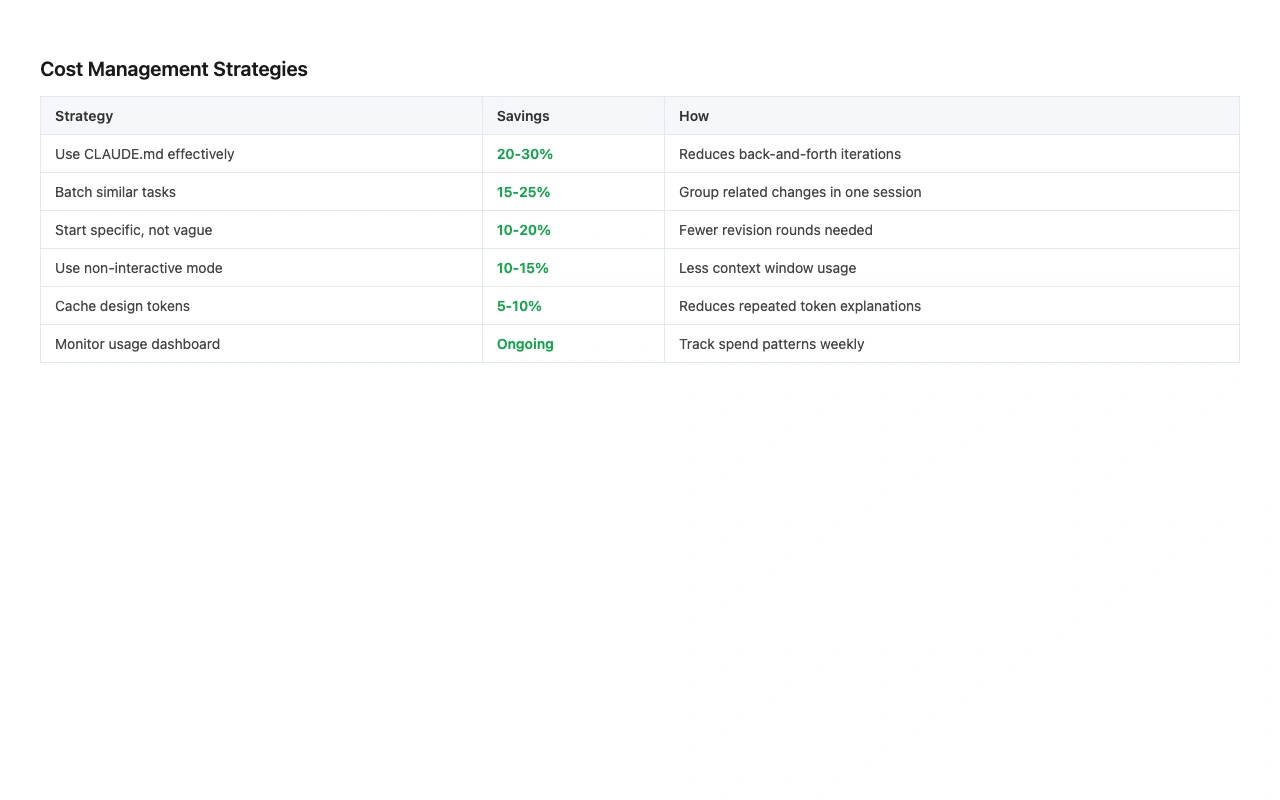
Cost Management Strategies
Managing costs with Claude Code is about making the most of every session. Here are the practical patterns that keep spending predictable.
| Action | When | Impact |
|---|---|---|
Monitor context with /context |
Every 3-4 prompts in a long session | See where your context is going before you run out |
Run /compact between tasks |
After finishing a design task, before starting the next | Frees context without losing project knowledge |
Use --max-budget-usd for scripted runs |
Batch operations, token extraction scripts | Hard cap prevents runaway spending |
| Start with Pro, upgrade on demand | When you hit rate limits consistently | Pay only for what you need |
Use --effort low for simple tasks |
Color extraction, font listing, file scanning | Reduces token usage without sacrificing quality on simple tasks |
| Break large tasks into sessions | Major redesigns, multi-page builds | Each session starts fresh, avoiding accumulated context bloat |
Third-Party Provider Options
Claude Code also works with third-party cloud providers. If your organization already has a contract with one of these, you might be able to use existing credits instead of a separate Claude subscription.
| Provider | Setup | Pricing |
|---|---|---|
| Amazon Bedrock | AWS credentials (aws sts get-caller-identity) |
Your AWS negotiated rates |
| Google Vertex AI | ANTHROPIC_VERTEX_PROJECT_ID + CLOUD_ML_REGION |
Your GCP negotiated rates |
| Microsoft Foundry | ANTHROPIC_FOUNDRY_API_KEY |
Your Azure negotiated rates |
claude -p "Extract all color variables from main.css and list them as design tokens" \
  --model haiku \
  --effort low \
  --max-budget-usd 0.50 \
  --max-turns 3
This command runs a quick extraction task using the cheapest model, limits the agentic turns to three, and caps spending at fifty cents. For repetitive tasks like extracting design tokens, auditing color usage, or scanning CSS files, this pattern keeps costs negligible.
For individual designers, Pro is the right starting point. The free tier does not include Claude Code, so Pro is your minimum entry. Start with Pro, use it for a month, and see if you hit rate limits. The Pro plan page itself says rate limits are the most common reason people upgrade. If you are using Claude Code daily for real design-to-code work, budget for Max 5x. It is the tier where usage stops being a concern and you can focus on design instead of rationing sessions.