C Troubleshooting and FAQ
Fixes for common problems, answers to frequent questions
Most Claude Code problems have simple fixes. Find your symptom, read the fix, get back to work.
C.1 Installation Problems
Installation Problems
The most common installation errors and their fixes, organized by what you see on screen.
| Symptom | Platform | Cause | Fix |
|---|---|---|---|
command not found: claude |
macOS / Linux | Install directory not in PATH | Run echo 'export PATH="$HOME/.local/bin:$PATH"' >> ~/.zshrc && source ~/.zshrc (Zsh) or the Bash equivalent. Verify with claude --version. |
'claude' is not recognized |
Windows | Install directory not in PATH | Add %USERPROFILE%\.local\bin to User PATH in System Settings → Environment Variables. |
dyld: cannot load |
macOS | macOS version too old | Update to macOS 13 (Ventura) or later. |
Killed during install |
Linux | Out of memory | Add 2 GB swap space. Claude Code needs at least 4 GB available RAM. |
Illegal instruction |
Linux | CPU lacks AVX support | Your processor is roughly pre-2013. No fix except newer hardware. |
Install script returns HTML / syntax error near unexpected token '<' |
All | Region blocked or network error | Claude Code is not available in all countries. Check anthropic.com/supported-countries. Also try: set HTTPS_PROXY if behind a corporate firewall. |
| TLS / SSL connection errors | All (corporate networks) | Firewall or proxy blocking | Set HTTPS_PROXY and HTTP_PROXY. Update CA certificates. Use NODE_EXTRA_CA_CERTS for corporate CA bundles. |
| Install hangs in Docker | Docker | Running installer from root directory | Set WORKDIR /tmp before running the installer. |
Conflicting Installations
Having multiple Claude Code installations (native installer, npm, Homebrew, WinGet) can cause version conflicts. Diagnose with which -a claude (macOS/Linux) or where.exe claude (Windows). Keep only the native installer at ~/.local/bin/claude and remove others:
npm uninstall -g @anthropic-ai/claude-code
rm -rf ~/.claude/local
brew uninstall --cask claude-code
winget uninstall Anthropic.ClaudeCode
WSL-Specific Issues
| Error | Cause | Fix |
|---|---|---|
Exec format error |
WSL1 binary incompatibility (known regression) | Convert to WSL2: wsl --set-version <DistroName> 2 |
exec: node: not found |
Using Windows Node.js instead of Linux Node | Install Node via Linux package manager or nvm |
| npm picks up Windows npm | Path resolution crosses filesystem boundary | Run npm config set os linux then npm install -g @anthropic-ai/claude-code --force |
| Browser opens on wrong machine | OAuth callback cannot reach local browser | Press c at login prompt to copy URL. Open in your local browser. Paste the code back. |
C.2 Common Issues and Fixes
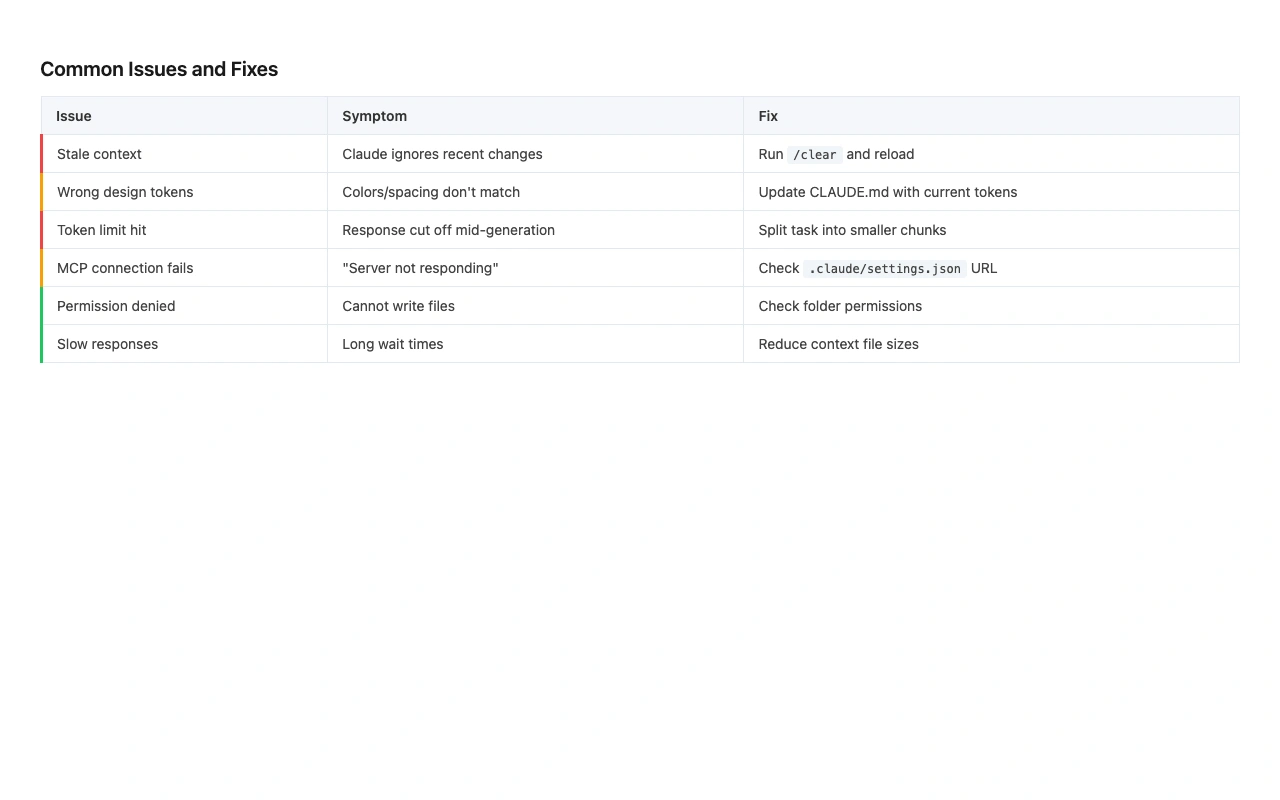
Common Issues and Fixes
The problems designers encounter most during normal use, with direct fixes and prevention tips.
Quick Diagnostic Flowchart
Before digging into specific issues, run /doctor inside Claude Code. It checks authentication, binary integrity, settings, MCP servers, and context usage automatically. Press f to have Claude fix reported issues.
| Problem | Likely Cause | Fix | Prevention |
|---|---|---|---|
| Claude edits the wrong files or makes unwanted changes | Too much autonomy without review | Press Esc+Esc to rewind changes. Use /diff to review all edits. |
Use Shift+Tab to switch to plan mode before risky changes. |
| High memory / CPU usage | Large codebase or accumulated context | Run /compact. Restart between major tasks. Add build directories to .gitignore. |
Compact regularly. Keep .gitignore current. |
| "Autocompact is thrashing" error | A file or tool output keeps refilling the context | Ask Claude to read files in smaller chunks. Run /compact with focus instructions. Move large-file work to a subagent. |
Avoid pasting full-page screenshots. Crop to relevant areas. |
| Session hangs or becomes unresponsive | Claude is stuck on a long operation | Press Ctrl+C to cancel. If unresponsive, close terminal and run claude --resume. |
Break large tasks into smaller prompts. |
| Search not finding files | Bundled ripgrep binary incompatible with your system | Install system ripgrep. Set USE_BUILTIN_RIPGREP=0. |
Keep system ripgrep installed as a fallback. |
| Output quality is inconsistent across sessions | No CLAUDE.md or stale CLAUDE.md | Create or update your CLAUDE.md with current design tokens and conventions. See Chapter 5. | Review CLAUDE.md monthly. Prune stale entries. |
| Rate limit errors | Exceeded plan usage limits | Wait for the limit window to reset. Run /compact and /clear to reduce per-session usage. Upgrade plan if consistent. |
Use /context to monitor usage. Compact between tasks. |
| OAuth login fails | WSL, SSH, or container environment | Press c at the login prompt to copy the OAuth URL. Open in a local browser. Paste the code into the terminal. |
Use the Desktop app for environments where OAuth is unreliable. |
| "This organization has been disabled" with active subscription | ANTHROPIC_API_KEY env variable overriding OAuth |
Run unset ANTHROPIC_API_KEY and log in again with claude auth login. |
Do not set ANTHROPIC_API_KEY if using a subscription. |
| Terminal display is garbled | Terminal rendering issue | Press Ctrl+L to redraw. Try a different terminal (iTerm2, Windows Terminal). | Use the Desktop app to avoid terminal rendering issues entirely. |
Platform-Specific Gotchas
| Platform | Gotcha | Fix |
|---|---|---|
| macOS | Option key shortcuts do not work | Configure "Option as Meta" in terminal settings (iTerm2: Profiles → Keys) |
| Windows | claude opens Desktop app instead of CLI |
Update Claude Desktop to latest version |
| Windows CMD | && is not valid error |
You are in PowerShell, not CMD. Use the CMD-specific installer. |
| WSL2 | Slow file operations | Move project to Linux filesystem (/home/) instead of /mnt/c/ |
| Linux (musl) | Shared library errors | Install libgcc libstdc++ ripgrep via apk add |
| Corporate network | TLS/cert errors on install | Set HTTPS_PROXY, update CA certs, use NODE_EXTRA_CA_CERTS |
If Claude Code will not start at all, run claude doctor from your regular terminal (not inside a Claude session). This runs the same diagnostics as /doctor but works even when Claude Code cannot launch properly.
C.3 Frequently Asked Questions
Frequently Asked Questions
The questions designers ask most often about Claude Code, with direct answers.
| Question | Answer |
|---|---|
| Can I use Claude Code without paying? | No. Claude Code requires a paid plan (Pro, Max, Team, or Enterprise) or an Anthropic Console API account. The Free plan does not include Claude Code. |
| Do I need to know how to code to use Claude Code? | No. You need to describe what you want. Claude handles the code. Understanding a few CSS concepts (padding, margin, flexbox) helps you write better prompts, but writing code yourself is not required. |
| I pasted a design mockup but Claude cannot see the image. What is wrong? | Use Ctrl+V (or Cmd+V in iTerm2, Alt+V on Windows) to paste images. The image should appear as an [Image #N] chip in your prompt. If your terminal does not support image paste, use the Desktop app or VS Code extension instead. |
| Claude Code keeps running out of context when I work with design files. What can I do? | Run /compact between tasks. Ask Claude to read design files in smaller sections. Crop screenshots to relevant areas instead of pasting full-page mockups. Run /context to see where your context is going. |
| I am hitting rate limits on Pro. Should I upgrade? | Rate limits are the most common reason people upgrade from Pro to Max. If you use Claude Code daily for design-to-code work, Max 5x ($100/mo) gives you 5x the usage. For heavy professional use, Max 20x ($200/mo) provides the most headroom. |
| Can I use Claude Code on Windows? | Yes. Native Windows via PowerShell or Git for Windows Bash, WSL2, and the Desktop app all work. WSL1 has known issues and should be converted to WSL2. |
| Claude is editing the wrong files or making changes I did not ask for. | Use Shift+Tab to switch to plan mode, where Claude explains what it would do before doing it. If unwanted changes were made, press Esc+Esc to rewind. Use /diff to review all changes. |
| How do I connect Claude Code to Figma? | Use Figma's current Claude Code MCP setup path first, usually the official plugin plus OAuth. Run /plugin or /mcp to check connection status. Use community servers only after you trust the maintainer, scopes, and secret handling. |
| My terminal looks garbled or the display is broken. | Press Ctrl+L to redraw the screen. If it persists, try a different terminal (iTerm2 on macOS, Windows Terminal on Windows). The Desktop app avoids terminal rendering issues entirely. |
| Can I use Claude Code with my team's existing AWS or GCP account? | Yes. Claude Code supports Amazon Bedrock, Google Vertex AI, and Microsoft Foundry as alternative providers. Each uses your existing cloud credentials and negotiated rates. |
| Is Claude Code available in my country? | Claude Code is not available in all countries. Check anthropic.com/supported-countries for the current list. |
| Where do I report bugs or request features? | Run /feedback inside Claude Code to report issues directly to Anthropic. You can also file issues at github.com/anthropics/claude-code/issues. |
Ninety percent of the issues designers encounter with Claude Code fall into two categories: context management and installation setup. Context issues (running out of space, thrashing, slow responses) are solved by building a habit of running /compact between tasks and cropping screenshots before pasting. Installation issues are one-time problems that vanish once your PATH, authentication, and terminal are configured correctly. Run /doctor once after setup, fix anything it flags, and you are set. If something breaks later, this appendix and the /doctor command are your first stops.